How to Create Product Bundles on Shopify: 5 Expert Tips for Effective Bundles
A Shopify product bundle combines two or more related items sold together as a single purchase, typically at a lower price than buying each item separately. In this article, we’ll show you how t

A Shopify product bundle combines two or more related items sold together as a single purchase, typically at a lower price than buying each item separately. In this article, we’ll show you how to create product bundles on Shopify and effectively implement them.
First, let’s explore why product bundling is beneficial to your Shopify store.
Why Product Bundling Works for Your Shopify Store
Product bundling boosts your Shopify sales by leveraging proven sales tactics that deliver better results. Here’s why it’s so effective:
- Increase average order value (AOV): Bundling encourages customers to buy more products in a single transaction. They perceive bundles as a better deal, which motivates them to spend more.
- Enhance perceived value: Shoppers feel they are getting more benefits with discounts or free gifts. This increases customer satisfaction and loyalty.
- Introduce new products: You showcase your offers to customers with new or unpopular items, which may lead to future purchases.
- Improve inventory management: Bundling enables you to move slow-selling or excess inventory, thus optimizing stock levels and reducing storage costs.
Now that you know the reason why Shopify product bundles are effective, let’s dive into how to set up this promotion on your store.
How to Create Product Bundles on Shopify: 2 Effective Methods
Option 1 – Using Shopify’s Built-in Tool
For merchants seeking free Shopify product bundle solutions, Shopify’s built-in discount functionality offers a solid starting point for your strategy on Shopify.
Step 1: Log into your Shopify Admin dashboard > Click Collections in the left-side navigation menu.
Step 2: Set up bundle discounts
- Click the Create collections button in the top right corner.
- Fill in a descriptive title and description.
- Select product bundles from your inventory.
- Click Save.
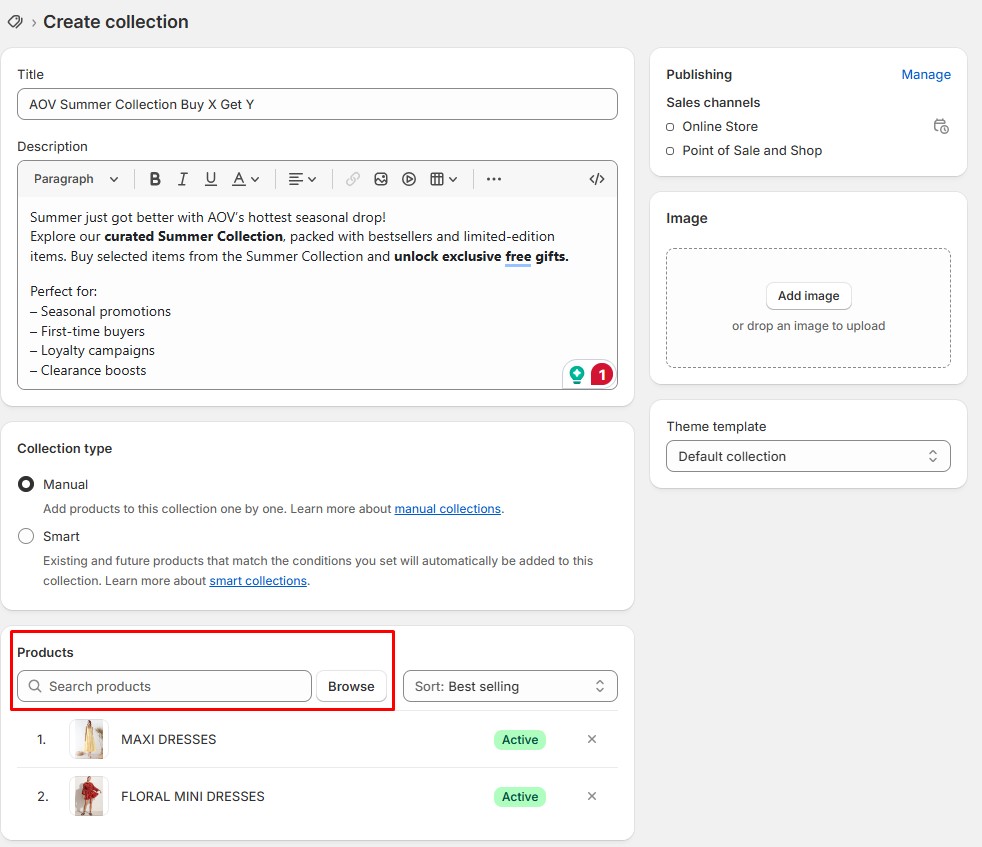
Group products manually into themed collections to power bundle logic like Buy X Get Y or clearance combos.
Step 3: Configure your bundle settings
- Navigate to Discounts in the menu bar.
- Click Create Discount and select the Buy X Get Y promotion type.
- Choose the Automatic discount for a seamless customer experience.
- Fill in the Discount title (e.g., “BUY X GET Y SUMMER COLLECTION”).
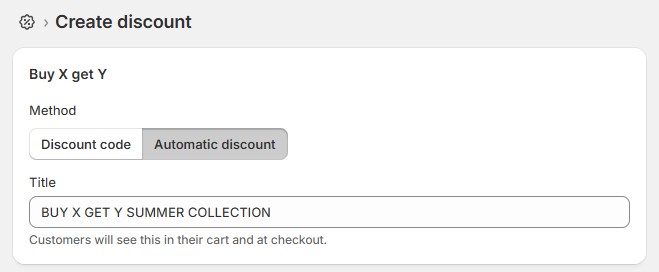
Create automated Buy X Get Y offers without discount codes—perfect for seasonal campaigns and fast checkout.
In Customer buys:
- Set minimum quantity to 1 item.
- Choose the Buy X Get Y collection from Step 2.
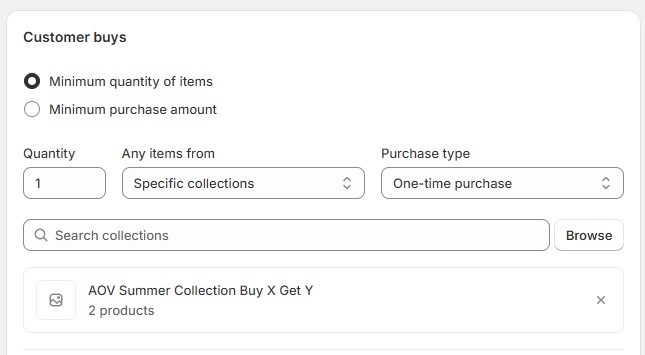
Define your bundle trigger based on product quantity or collection using Shopify’s built-in discount engine.
In Customer gets:
- Set the quantity to 1 item for any specific item or collection to receive a free item, a fixed amount, or a percentage discount.
Pro tip: Set maximum uses per order to 1 to prevent promotion abuse.
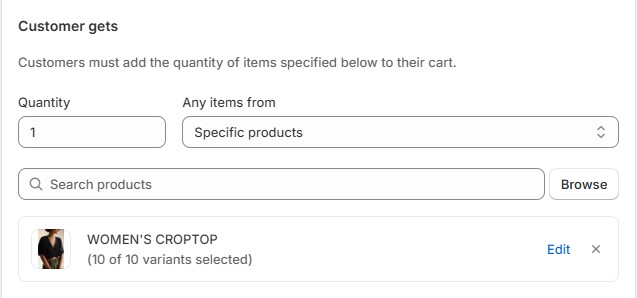
Create automated Buy X Get Y offers without discount codes, perfect for seasonal campaigns and fast checkout.
Step 4: Under Advanced conditions
- Enable POS integration to sync in-store promotions (if applicable).
- Combine product bundles with product discounts or shipping discounts to evaluate the performance of the promotion.
Step 5: Activate your promotion
- Schedule campaign start and end dates
- Click Save discount to implement.
Shopify’s built-in tools work well for simple bundles, but as your store grows, you might need the extra features that specialized apps offer. You can explore some of the best Shopify discount apps to find tools that support both product bundling and advanced promotion types.
Option 2 – How to Bundle Products on Shopify with Third-Party Apps
AOV Volume Discounts Bundles, one of the best Shopify product bundle apps, helps merchants configure various product bundling strategies, including AI-suggested frequently bought together and mix-and-match bundles.
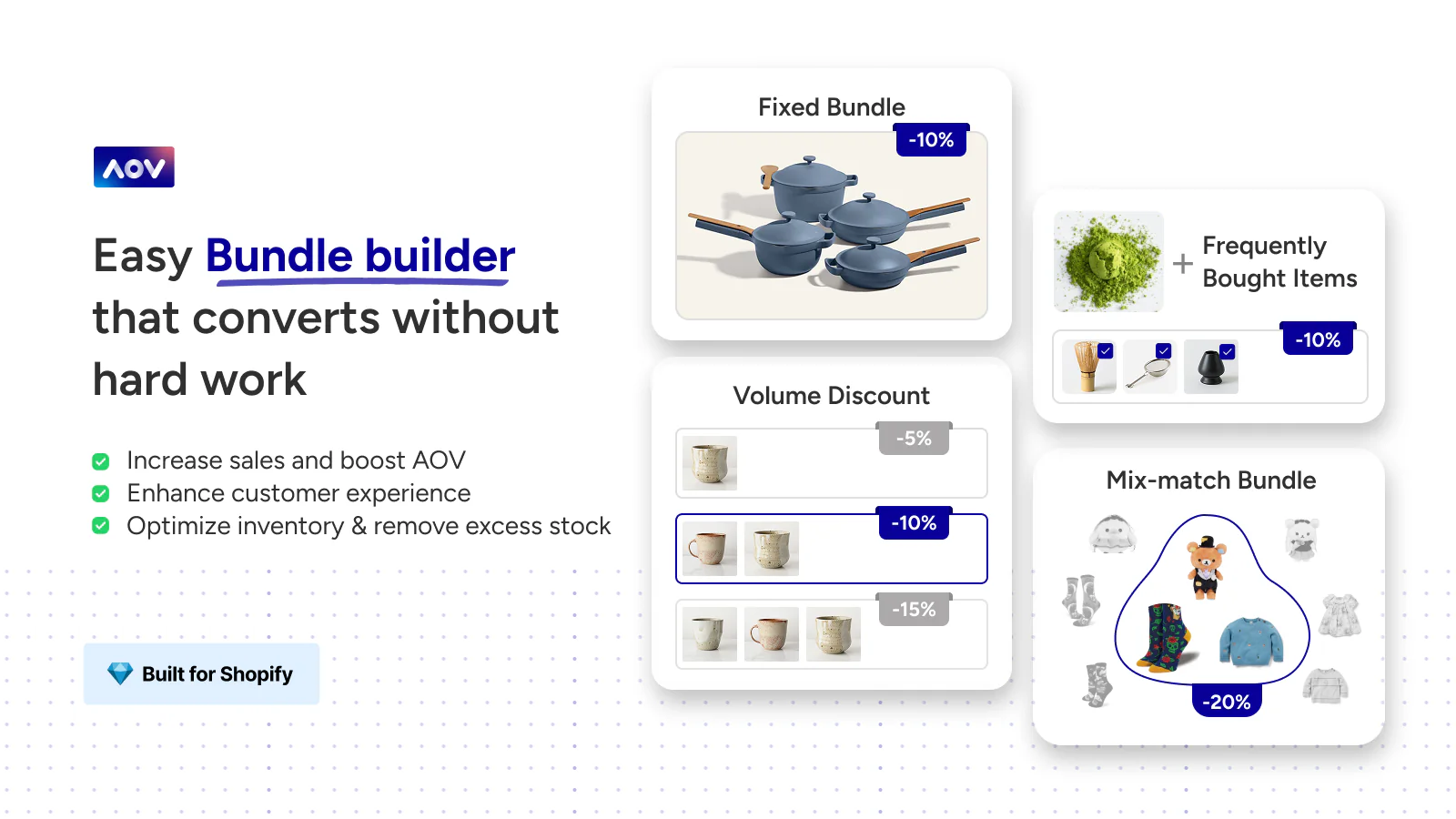
AOV Volume Discounts Bundles app for Shopify offers flexible options with AI-powered suggestions.
General app information
- Rating: 4.9/5 (103 reviews)
- Developer: AOV.ai (by Avada)
- Pricing: Free
- Free plan: Yes
Best for:
- Large product catalog stores (e.g., fashion, construction tools).
- Non-English-speaking merchants (e.g., local shops in diverse communities).
- Budget-conscious teams (e.g., family-run businesses).
Now we’ll learn how to implement one of the best product bundling promotions, the frequently bought together strategy, using this specialized app:
Step 1: Create your campaign
- Navigate to the AOV Volume Discounts Bundles dashboard.
- Click Create in the Frequently Bought Together (FBT) section or Offers in the left-hand menu bar.
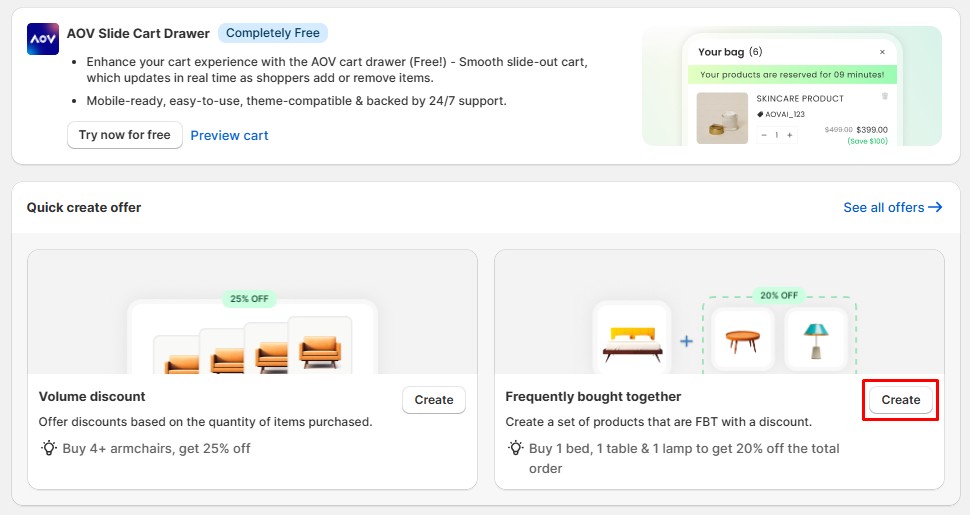
Use AOV’s Quick Create panel to launch bundle campaigns, such as volume discounts or FBT, in minutes.
Step 2: Set up your bundle logic
- Name your campaign clearly (e.g., Frequently bought together #2).
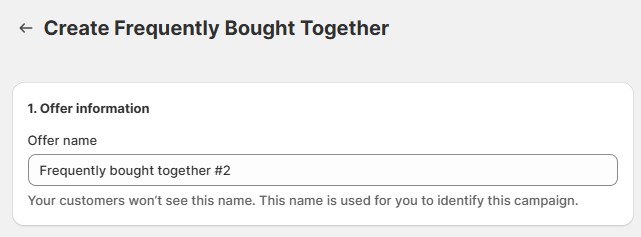
Create smart bundles based on products frequently bought together to increase AOV effortlessly.
Trigger your offer conditions:
- Select the specific product(s) or collections that qualify.
Choose your supplementary item in 4 ways:
- AI-recommended products: AI suggests a product based on trending choices
- Same collection: Offer the same collection as the qualified collection.
- Specific product: Choose a particular product from the inventory.
- Specific collection: Choose a specific collection from the inventory.
Pro tip: Enable Free gift selection when customers buy all products to enhance the shopping experience.
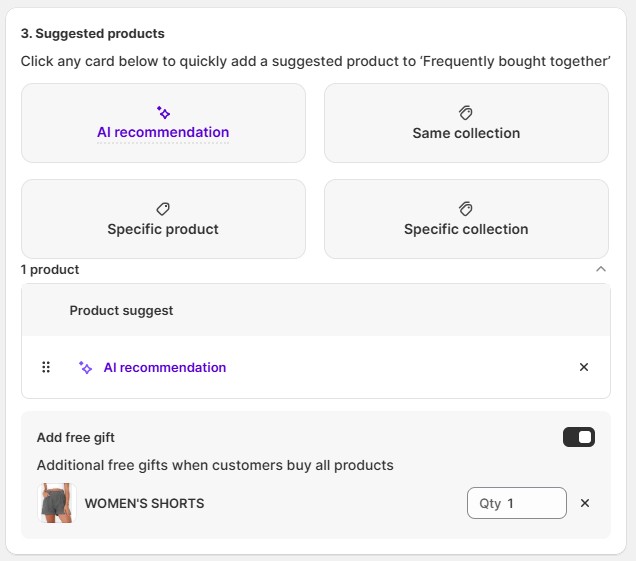
Enhance bundle appeal with AI-powered suggestions and conditional free gifts.
Step 3: Apply Discount settings (Optional)
- Limit total redemptions to 1 per customer to maintain profitability.
- Set discount percentages for bundled items.
- Add combination rules for products, orders, and shipping.
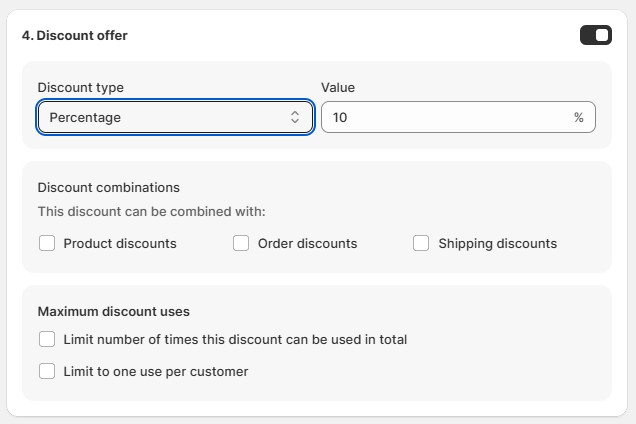
Set up automatic percentage discounts for product bundles with AOV’s “Frequently Bought Together” campaign.
Step 4: Set up your widget styling
- Fill in offer messages matching your brand.
- Set up redirect behavior after adding items to the cart.
- Configure advanced settings for minimum quantities.
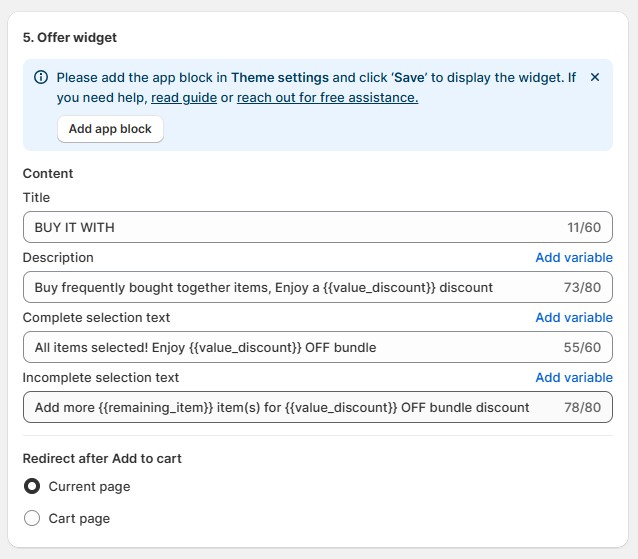
Customize your bundle messaging and display with AOV’s Offer Widget to boost upsell clarity.
Step 5: Enable Advanced settings
- Apply min product to receive a discount: Set a minimum product quantity to qualify for discounts or receive a free gift.
- Exclude trigger product from discount: Only suggested bundled items are eligible for the discount.
Step 6: Save and Activate
- Click Save at the top of the screen.
- Your offer is now live on your store.
Step 7: Test your product bundling offer
- Add qualifying items to your cart.
- Verify that your Frequently Bought Together offer applies correctly at checkout.
- Test across both desktop and mobile devices to ensure consistent functionality.
For Shopify beginners looking to explore alternative methods to AOV, consider using upselling on Shopify to boost your revenue and enhance customer experience effectively.
With your technical setup complete, let’s explore the different types of promotions you can offer to maximize engagement and conversion rates.
5 Tips to Create Effective Product Bundles on Shopify
Even the best promotion plan can fail without good execution. Here are five strategies to enhance your bundling campaigns and achieve better results for your business.
1. Complementary product bundling
Your sales data helps you identify items that complement each other, such as a skincare set or a phone with a case and charger. This not only increases perceived value but also encourages customers to buy more in a single transaction.
2. Strategic bundle pricing
You can offer a compelling discount on the Shopify bundle products. Test different pricing strategies (percentage off vs. fixed discount) to see what resonates best with your audience.
3. Clear, benefit-focused bundle’s name
A descriptive, catchy name helps customers immediately understand the value and purpose of the bundle. Name your bundle based on the primary benefit or the occasion it serves. For example:
- Beach Vacation Kit.
- “Get A Pack of 6 Coasters, 20% Off the Cup”.
- “Buy 2 Chairs, Get A Free Table”.
4. Apps for optimization and management
Shopify’s built-in tool limits bundling options. You can utilize the third-party product bundle app to enhance bundle creation, such as mix-and-match or variant-based bundles with advanced customization options.
5. Display your offer effectively
The more visible your bundles, the more likely customers are to add them to their carts. You can feature your bundles in high-traffic areas, such as your homepage, product pages, or a dedicated bundles page. You can try these three strategies to highlight your bundle offers:
- Email marketing: Promote your product bundles on Shopify offers to existing customers through targeted email campaigns.
- Banners: Use eye-catching banners on high-traffic pages to highlight Shopify bundled products.
- Social media: Share bundle offers across your social channels to maximize reach and engagement.
These practical tips can help you enhance the way you bundle your products on Shopify, attract customers, and increase your revenue more quickly.
Conclusion
Through these top 10 product bundle apps on Shopify, you now have everything you need to implement successful product bundling campaigns. By following our step-by-step tutorial and strategic tips, you can effectively enhance your sales and attract customers.
FAQs: Product Bundles on Shopify
Frequently Asked Questions
How do bundles work on Shopify?
- Manual bundles: You create a new product (e.g., “Starter Skincare Set”) that includes other SKUs and manage inventory manually.
- App-powered bundles: Apps like AOV Free Gift Buy X Get Y, or AOV Volume Discounts Bundles help manage bundles with AI-powered campaigns such as Buy X Get Y and Frequently Bought Together.
What is the difference between a product and a bundle?
Is bundling more profitable than selling separately?
- Increase average order value: Customers purchase more items at once, thereby raising the total value per transaction.
- Move more inventory: Bundling can help clear slow-moving stock by pairing it with popular items.
- Enhance perceived value: Customers feel valued because they receive more for a lower price, which increases conversion rates.